(E) What I had to do to have both the iPort and a Mezzanine Board on my Rev-A-iMac... (D) Was man nicht alles tut, um sowohl den Griffin iPort, als auch eine Mezzanine-Platine in meinem Rev-A-iMac zu haben.... L' iPort prende i cavi flat interni del video e dell'IrDA per fornire una presa seriale geoport, localTalk compatibile, e una presa video standard mac. E - The iPort uses the flat video cables and the IrDA cables to provide a serial, GeoPort-compatible serial port, as well as a standard Mac monitor output. The problem is that it uses the square slot and the space beneath the motherboard, making it impossible to install Mezannine cards (the iPort does not use the Mezzanine slots - it "just" covers it physically). So I moved the iPort... to the other side! :-) D - Der iPort verwendet die flat cables vom iMac-Video und die IrDA Kabel um einen GeoPort fähigen seriellen Port und einen Standard-Mac Video Ausgang anzubieten. Das Problem ist, dass er dabei den rechteckigen Ausgang für Mezzanine-Karten und den Platz unter der Hauptplatine verwendet: Dies verhindert die Installation von Mezzanine-Karten, obwohl der iPort den Mezzanine-Slot gar nicht verwendet. Also habe ich den iPort.... auf die andere Seite verlegt! :-) |
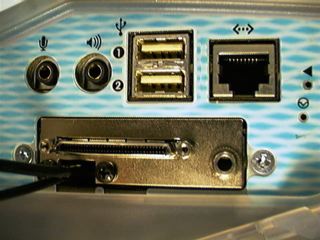
![]() | I - Questa immagine mostra come appare lo slot una volta montata la scheda iproRaidTV. Si notano il minuscolo connettore SCSI V, la presa sound out e i due cavi per l'antenna e il video in composito. E - This image shows how the slot looks like after installing the iProRaidTV. You can see the micro SCSI V connector (Ultra micro 0.8mm 68-pin connector), the sound out port, and the two input cables (coaxial + composite) D - Dieses Bild zeigt, wie es nach der Installation der iProRaidTV aussieht: Der Micro SCSI V Connector, der Sound-Out (rechts), und die zwei input Kabel (Antennenkabel + Videokabel) links unten. | |
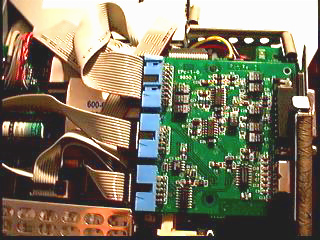
![]() | I - Il nuovo posto per l'iPort, a sinistra si intravedono la scheda processore e la batteria E - The new place for the iPort. On the left you can see processor board and battery... D - Das neue Zuhause für den iPort. Links kann man (gerade noch) die Prozessorplatine und die Batterie sehen... | |
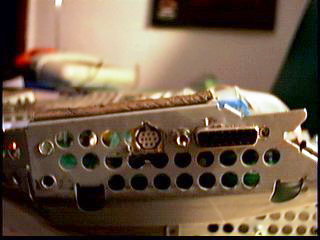
![]() | Ho tagliato la lamiera dello chassis per far uscire la presa video e la seriale. La foto e' stata presa prima del necessario lavoro di rifinitura. E - I cut the metal part of the chassis to get out the video cable and the serial cable. D - Ich musste das Metallgehäuse im iMac durchbohren, um sowohl das Video- als auch das serielle Kabel durchschleifen zu können. (Das Photo wurde vor den kosmetischen Nachbearbeitungen geschossen...) | |
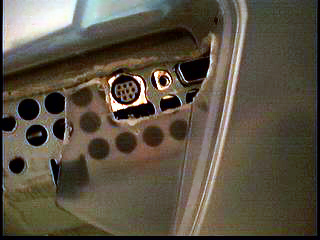
![]() | Ho tagliato poi la plastica per dare spazio alle prese durante il riassemblamento dell'iMac. Anche qui ci sono state delle successive rifiniture (labor limae!). E - Afterwards I hat to cut the plastic chassis to reasseble the iMac. I had to make some room for the connectors... ("some" filing work...) D - Das Plastik musste auch mit der Feile bearbeitet werden, um beim Aufbau Platz für die Stecker zu schaffen... | |
![]() |
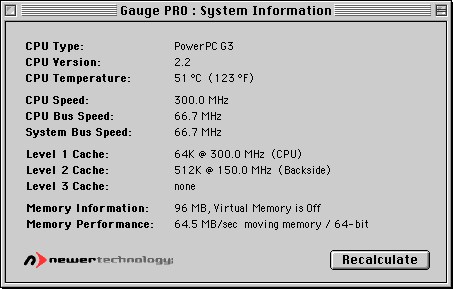
Non si verificano surriscaldamenti nemmeno con l'iMac overclokkato a 300 Mhz e il bus della backside cache a 150 MHz. My iMac works fine and does not overheat, even with 300MHz processor overclock and 150MHz backside cache (ratio overclock...) Mein iMac funktioniert wunderbar, ohne Überhitzung, trotz des 300MHz-overclock am Prozessor und der mit 150MHz- getakteten backside cache... | |
| | ||
| Altre Info: Visita la Formac per maggiori informazioni sulla scheda, oppure mandami un' email! More Information: Go to Formac's website or send me an email! Mehr Informationen: Auf der Formac-Website oder aus meiner Mailbox... Ringraziamenti / Thanks to / Ich bedanke mich bei...: Massimo SENNA SENNA Computer Shop per avermi mandato l'indispensabile cavo SCSI (68p VHDCIm / 50p Centr. m#30737) della Lindy (This guy sent me the otherwise unfindable cable for the Formac card!) |