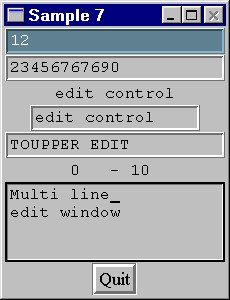
This example shows the use of the five callbacks available, each set in a different Object. The function ValidateString() returns ‘True’ when the text string argument consists of alternating even and odd ASCII characters. The ValidateCB() function is called when the first EDIT Object is about to lose input focus voluntarily (for example after pressing the ‘Tab’ key) or by force (for example if another window is activated or another Object is selected via MSelectObject()). The structure EDIT_VAL, passed as pointer in the second argument to the callback, is defined as follows :
/* C version */
/*
 * sample 7
 */
#include <stdio.h>
#include <stdlib.h>
#include <string.h>

#include "mgui.h"

#define IsEven(a)       (!((a)&1))

void ExitCB(MOBJECT obj, void *a, void *b)
{
   MShellDestroy((MOBJECT)b);
   MGUITerm();
   exit(0);
}

int ValidateString(char *ps)
{
   int val, even, old;

   val = True;
   old = IsEven(*ps);
   if (*ps != '\0') {
      for (ps++; *ps && val; ps++, old=even)
         val = old ^ (even = IsEven(*ps));
   }
   return val;
}

void ValidateCB(MOBJECT edit, EDIT_VAL *ev, void *ii)
{
   ev->text_validated = ValidateString(ev->text);
   if (!ev->text_validated && !ev->focus_lost)
      ev->focus_leave = False;
}

void ValueChangeCB(MOBJECT edit, EDIT_CHANGE *ec, void *ii)
{
   char buff[128];

   if (!strcmp(ec->current_text, "1234567890")) {
      ec->exec = False;
      return;
   }
   strncpy(buff, ec->current_text, ec->pos);
   strcpy(buff + ec->pos, ec->change);
   strcat(buff, ec->current_text + ec->pos + ec->len);
   ec->exec = ValidateString(buff);
}

void NewValueCB(MOBJECT edit, char *new, void *label)
{
   MObjectSetText((MOBJECT )label, new);
}

void ActivateCB(MOBJECT edit, char *text, void *ed)
{
   static int notify;

   notify ^= 1;
   MEditSetTextExt((MOBJECT )ed, text, False, notify);
}

void NewPosCB(MOBJECT edit, EDIT_CURS *ec, void *label)
{
   char str[128];

   sprintf(str, "%-3d - %-3d", ec->pos_y, ec->pos_x);
   MObjectSetText((MOBJECT )label, str);
}

void MGUIMain(int argc, char **argv)
{
   MOBJECT shell, pb, edit, edit2, label;
   MTColor black, white, seagreen, cadetblue;

   black = MBlackColor();
   white = MWhiteColor();
   cadetblue = MAllocColor(0x60, 0x85, 0x95);
   seagreen = MAllocColor(0x70, 0xa5, 0xa0);

   shell = MCreateShell("Sample 7", SF_NO_CLOSE);

   edit = MCreateEdit(shell, "", 20, DEFAULT_FONT);
   MEditSetFilter(edit, DIGIT, "");
   MEditSetValCallback(edit, ValidateCB, NULL);
   MEditSetValidatedColors(edit, cadetblue, white);
   MEditSetNotValidatedColors(edit, seagreen, black);

   edit = MCreateEdit(shell, "", 20, DEFAULT_FONT);
   MEditSetFilter(edit, DIGIT, "");
   MEditSetValueChangeCallback(edit, ValueChangeCB, NULL);

   label = MCreateLabel(shell, "", DEFAULT_FONT);

   edit = MCreateClippedEdit(shell, "", 15, 20, DEFAULT_FONT);
   MEditSetNewValueCallback(edit, NewValueCB, label);

   edit2 = MCreateEdit(shell, "", 20, DEFAULT_FONT);
   MEditSetFilter(edit2, UPALPHA, "_ ");
   MEditSetActCallback(edit2, ActivateCB, edit);

   label = MCreateLabel(shell, "", DEFAULT_FONT);

   edit = MCreateClippedMLEdit(shell, "", 15, 4, DEFAULT_FONT);
   MEditSetCursorPosCallback(edit, NewPosCB, label);

   pb = MCreatePButton(shell, "Quit", TIMES_L_FONT);
   MPButtonSetCallback(pb, ExitCB, shell);

   MShellRealize(shell);

   MMainLoop();
}
typedef struct {
   char *text;      /* EDIT text */
   short len;      /* Text lenght */
   int key;      /* Key code originator (0 if not applicable) */
   unsigned focus_lost;    /* If True, EDIT will lose the focus anyway */
   unsigned focus_leave;   /* If set to False, EDIT will keep focus */
   unsigned text_changed;  /* If set to True EDIT redraws itself */
   unsigned text_validated; /* If set to True EDIT becomes validated */
} EDIT_VAL;
EDIT uses this structure to notify the callback about: the Object text
(with the ‘text’field); current text lenght (with the ‘len’ field); the
code of the key that caused the call (with the ‘key’field) which is equal
to zero if the call occurs due to an event other than a key press; finally
the ‘focus_lost’ field notifies whether the application can request the
Object to keep the input focus or not. If the ‘focus_leave’ field is set
by the callback to False (and ‘focus_lost’ is False), then the EDIT Object
retains the input focus. Within the callback code the application can change
the ‘text’ string and set the ‘text_changed’ field to True. In this case
the Object will perform a redraw. The 'focus_leave' field is preset to
True by the Object before calling the callback. If the application wants
the EDIT to keep the input focus, then the callback code should set to
False this field. It’s also possible to change the EDIT content from within
this callback by directly writing the new value in the ‘text’ pointer and
setting the ‘text_changed’ field to True.This feature should only be used
in single- line EDIT Objects. The ‘text_validated’ field determines the
desired validation status for the Object. The ValidateCB() in the above
example uses the function ValidateString() to set the validation status.
Moreover, if this status is False and the input focus not lost, the callback
queries the Object to keep the input focus. The ValueChange callback is
activated every time the content in the EDIT Object changes. This callback
lets the application control the input in the EDIT and optionally inhibit
a change when needed. In the following is described the structure passed
to the callback as the second parameter:
typedef struct {
   char *current_text;   /* EDIT text before the change */
   char *change;      /* New text to be inserted */
   int pos;         /* Change start position */
   int len;         /* Changing text lenght */
   unsigned validate;   /* Validation flag */
   unsigned exec;      /* Change accepted by the callback */
} EDIT_CHANGE;
The first field points to the EDIT value before the change occurs, while
the second points to the new text to inserted (eventually a null string).
The ‘pos’ field specifies the insert position relative to the current text
value. The new text, specified by ‘change’ will substitute ‘current_text’
starting from ‘pos’ and with lenght ‘len’ with the value in ‘change’. The
‘validate’ field is preset to False, unless the callback is called due
to the application call to MEditSetTextExt(), in which case it has the
value specified as the third argument in that call. This field can be changed
within the callback to set the desired validation status. If the last field
is set to False, then the change is refused. The callback function ValueChangeCB()
in example 8 refuses a text modification when it has reached the value
"1234567890". Otherwise the change is permitted only if the resulting new
text causes a True return from the ValidateString() function. The NewValue
callback is the simplest one that lets the application control the input.
It receives as the Object data (second argument) directly the current text
value, after the change occurs. The NewValueCB() in the above example uses
its current text to set the value in a LABEL Object, identified by the
callback application data (the third argument). Notice that the third EDIT
in the example is created via a MCreateClippedEdit() function call. This
function has an additional argument which lets the EDIT Object have an
actual lenght greater than the visible one. The Activate callback, called
by the EDIT Object when the ‘Enter’ key is pressed on it, receives as second
argument the Object text. In the above example the ActivateCB() function
is used to set its current text in the third EDIT Object. When the value
of the ‘notify’ parameter passed to MEditSetTextExt() is a boolean True,
the third Object will call its ValueChange callback. Functions MBlackColor()
and MWhiteColor() respectively return the preallocated black and white
color identifiers. The ‘seagreen’ and ‘cadetblue’ colors, allocated via
the MAllocColor() function, should be freed with a call to MFreeColor()
when no more needed. This is however not necessary since they are used
for the entire program execution, and they are automatically freed by the
MGUITerm() function call. A filter is set to the first EDIT Object making
it accepts digit characters only. The validation status for this Object
is highlighted with different colors. The filter set in the fourth EDIT
lets it accept alphabetic characters, converted to upper case, and the
additional character ‘_’. Last EDIT is a clipped multi-line type. A scrolled
version is also available via the MCreateScrolledMLEdit(), with the same
arguments. The CursorPosition callback is set to this Object in the example.
It traces cursor position within the EDIT while it changes. The structure
notified by the EDIT to this callback (a pointer to it as the second parameter)
is described in the follwing:
typedef struct {
   int pos;      /* position in the stream */
   int pos_x;      /* position x */
   int pos_y;      /* position y */
} EDIT_CURS;
// C++ version

#include <stdio.h>
#include <string.h>
#include "mguipp.h"

#define IsEven(a)       (!((a)&1))

class CaAppl : public CmAppl {
public:
   void start(int, char **);
};

CaAppl appInstance;

class CaMainWindow : public CmShell {
   CmLabel *label;
   CmLabel *pos_label;
   CmEditField *edit;
public:
   CaMainWindow(const char *title, int flags);
   int validateString(char *ps);
   void validateCB(EDIT_VAL *ev);
   void valueChangeCB(EDIT_CHANGE *ec);
   void newValueCB(char *newText);
   void activateCB(char *newText);
   void newPosCB(EDIT_CURS *ec);
   void exitCB(void);
};

void CaMainWindow::exitCB(void)
{
   delete this;
   CmAppl::end(0);
}

void CaAppl::start(int argc, char **argv)
{
   CaMainWindow *win = new CaMainWindow("Example 7", SF_NO_CLOSE);
   win->realize();
   mainLoop();
}

CaMainWindow::CaMainWindow(const char *title, int flags)
: CmShell(title, flags)
{
   CmEditField *ef;
   CmEditWindow *ew;
   CmPushButton *pb;
   CmSharedColor black(0, 0, 0);
   CmSharedColor white(0xff, 0xff, 0xff);
   CmSharedColor cadetblue(0x60, 0x85, 0x95);
   CmSharedColor seagreen(0x70, 0xa5, 0xa0);

   ef = new CmEditField(this, "", 20, DEFAULT_FONT);
   ef->setFilter(DIGIT, "");
   ef->setValidateCallback(this, (EDITVAL_CB)validateCB);
   ef->setValidatedColors(&cadetblue, &white);
   ef->setInvalidatedColors(&seagreen, &black);

   ef = new CmEditField(this, "", 20, DEFAULT_FONT);
   ef->setFilter(DIGIT, "");
   ef->setValueChangeCallback(this, (EDITCHANGE_CB)valueChangeCB);

   label =new CmLabel(this, "", DEFAULT_FONT);

   edit = new CmEditField(this, "", 15, 20, DEFAULT_FONT);
   edit->setNewValueCallback(edit, (STRING_CB)newValueCB);

   ef = new CmEditField(this, "", 20, DEFAULT_FONT);
   ef->setFilter(UPALPHA, "_ ");
   ef->setActivateCallback(this, (STRING_CB)activateCB);

   pos_label = new CmLabel(this, "", DEFAULT_FONT);

   ew = new CmEditWindow(this, "", 15, 4, DEFAULT_FONT);
   ew->setCursorCallback(this, (EDITCURS_CB)newPosCB);

   pb = new CmPushButton(this, "Quit", TIMES_MEDIUM);
   pb->setCallback(this, (VOID_CB)exitCB);
}

int CaMainWindow::validateString(char *ps)
{
   int val, even, old;

   val = True;
   old = IsEven(*ps);
   if (*ps != '\0') {
      for (ps++; *ps && val; ps++, old=even)
         val = old ^ (even = IsEven(*ps));
   }
   return val;
}

void CaMainWindow::validateCB(EDIT_VAL *ev)
{
   ev->text_validated = validateString(ev->text);
   if (!ev->text_validated && !ev->focus_lost)
      ev->focus_leave = False;
}

void CaMainWindow::valueChangeCB(EDIT_CHANGE *ec)
{
   char buff[128];

   if (!strcmp(ec->current_text, "1234567890")) {
      ec->exec = False;
      return;
   }
   strncpy(buff, ec->current_text, ec->pos);
   strcpy(buff + ec->pos, ec->change);
   strcat(buff, ec->current_text + ec->pos + ec->len);
   ec->exec = validateString(buff);
}

void CaMainWindow::newValueCB(char *newText)
{
   label->setText(newText);
}

void CaMainWindow::activateCB(char *text)
{
   static int notify;

   notify ^= 1;
   edit->setTextExt(text, False, notify);
}

void CaMainWindow::newPosCB(EDIT_CURS *ec)
{
   char str[128];

   sprintf(str, "%-3d - %-3d", ec->pos_y, ec->pos_x);
   pos_label->setText(str);
}